> ## Documentation Index
> Fetch the complete documentation index at: https://docs.zazubot.com/llms.txt
> Use this file to discover all available pages before exploring further.
# User preferences
export const YoutubeVideo = ({id}) =>
;
## Change language
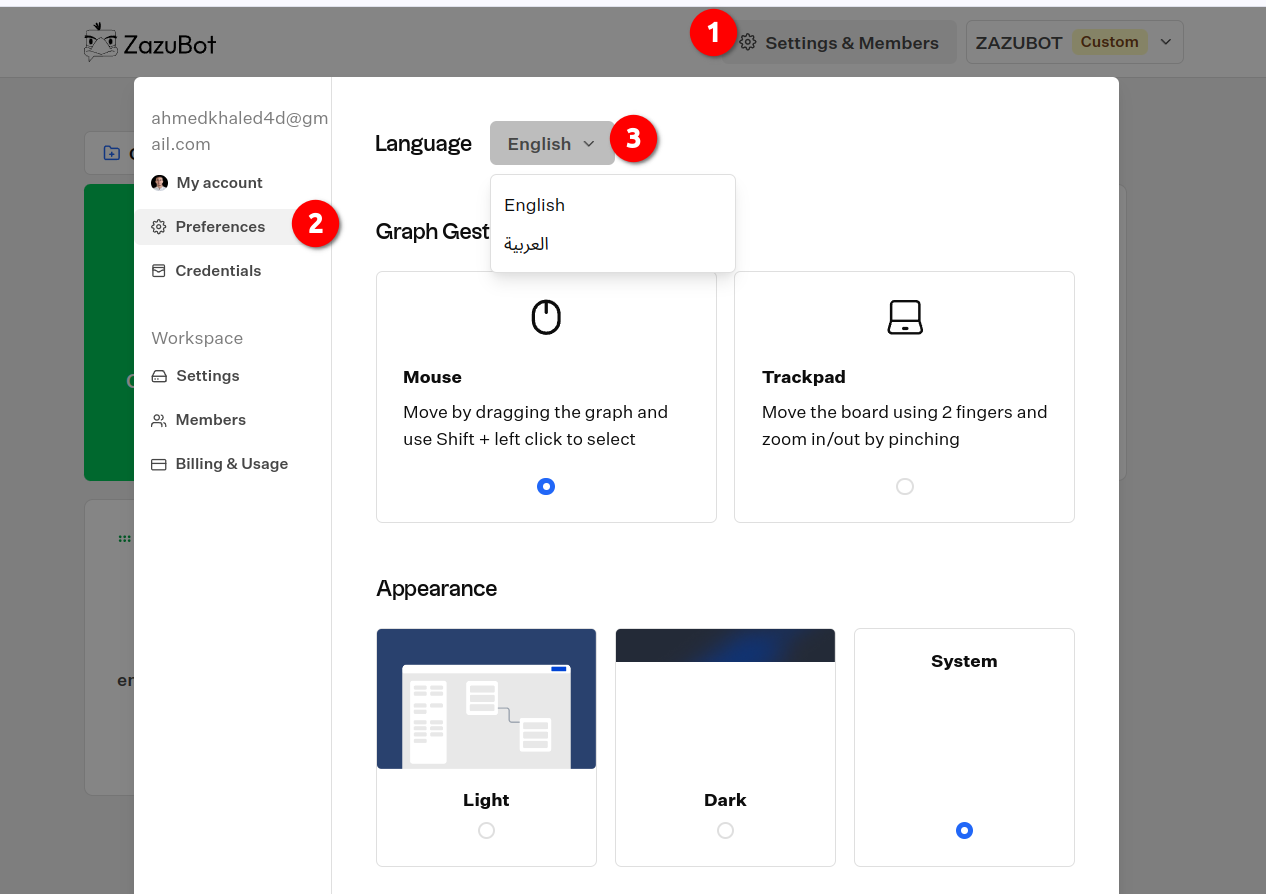
You can change the language of the application by going to your `Settings & Members` menu under the `Preferences` tab.
The application is still being translated, so some parts may not be translated
yet.
## Generate groups title with AI
You can automatically have your group titles generated with AI by going to your `Settings & Members` menu under the `Preferences` tab.
Here you'll have to configure your AI provider.
If you don't see your provider credentials listed that's because you don't
have it in your personal user credentials. [See distinction between worksapce
and user credentials.](./credentials)
Once enabled and properly configured, you'll see default group titles (starting with "Group #") changing whenever you connect a new group/block from this group.
 ## Generate groups title with AI
You can automatically have your group titles generated with AI by going to your `Settings & Members` menu under the `Preferences` tab.
Here you'll have to configure your AI provider.
## Generate groups title with AI
You can automatically have your group titles generated with AI by going to your `Settings & Members` menu under the `Preferences` tab.
Here you'll have to configure your AI provider.